
The short answer
To stop mindless eating, take the distraction out of eating and put a plan in its place. The phone that tempts you to scroll and snack can also do the opposite: set a Focus mode for meals, app limits for the evening, a 20-minute timer to slow down, reminders for planned snacks and a shared grocery list so the pantry holds better choices. Then add one planned, satisfying habit after your main meal, such as a Hinuki pomegranate jelly stick, so there is less room for unplanned grazing.
You open a bag of crackers “just for a few,” scroll for a while, and suddenly the bag is empty and you cannot remember tasting any of it. That is mindless eating, and almost everyone does it. Nutrition guides and dietitians tend to agree on the main culprit: eating while distracted, especially with a phone or screen. The good news is that the same phone comes with free, built-in tools that can break the pattern. No new app to buy, no tracking of personal health data. Just settings you already have.
Why mindless eating happens
Mindless eating is less about hunger and more about attention. When your brain is busy with a screen, it pays less attention to taste, texture and the slow signals of fullness. A few common triggers:
- Screens at the table. Scrolling, TV or work emails while eating make it easy to keep going long after you are satisfied.
- Habit loops. The same snack at the same time and place every day, whether you are hungry or not.
- Boredom, stress and tiredness. Food becomes a quick break or a reward.
- Meals that do not hold you. A light, low-fiber lunch leaves room for constant grazing in the afternoon. Our guide to daily gut health habits covers the fiber side.
Fullness also takes time to register, which is why many guides suggest giving a meal around 20 minutes. Eat in five, and your brain has not caught up yet.
9 free tools that make mindless eating harder
All of these are built into your phone or into free apps most people already use. Pick two or three to start.
1. A Focus mode for meals
On iPhone, Focus (Settings › Focus) lets you create a “Meal” mode that silences notifications and can turn on automatically at set times. On Android, Do Not Disturb or the Focus mode in Digital Wellbeing does the same. No pings, no reason to pick up the phone mid-bite.
2. App limits on your “snack scroll” apps
Most mindless snacking happens with a specific app open. iPhone Screen Time (App Limits) and Android Digital Wellbeing (app timers) let you cap those apps in the evening. When the limit pops up, it doubles as a reminder to check in: am I actually hungry?
3. Downtime or Bedtime mode for the evening
Evening grazing is the classic pattern. Set iPhone Downtime or Android Bedtime mode to start an hour or two before bed: fewer apps, a grayscale screen on Android, and a natural signal that the kitchen is closed.
4. A 20-minute timer for meals
Open the Clock app, set a 20-minute timer when you sit down, and try to make the meal last until it rings. Put your fork down between bites and sip water. It feels slow at first; that is the point.
5. Reminders for planned snacks
Unplanned snacks are the mindless ones. Use Reminders on iPhone or Google Calendar alerts to schedule one planned snack in the afternoon, for example fruit and nuts at 3:30 p.m. Knowing it is coming makes it easier to skip the vending machine.
6. A pause question on your lock screen
Set a simple lock screen photo or widget with a reminder to pause, like a picture of a glass of water, so every time you reach for the phone near the kitchen, you get a nudge to check: hungry, thirsty, bored or tired?
7. A shared grocery list
What is in the pantry decides what you graze on. A shared list in Notes, Reminders or Google Keep lets the whole household add filling, fiber-rich foods, so the easy grab at home is a better one. Our article on how many vegetables to eat a day has ideas to fill that list.
8. A water reminder
A glass of water before you decide to snack gives you a natural pause. Set a repeating reminder or use your phone’s built-in clock alarms at a few fixed times during the day.
9. A daily anchor alarm for your fullness habit
Pick one moment, such as right after lunch, and set a recurring alarm labeled with your habit. That is where a planned, satisfying step fits best (more on that below).
Your phone settings at a glance
| Moment | iPhone (free, built in) | Android (free, built in) | What it does for you |
|---|---|---|---|
| Meals | Focus mode | Do Not Disturb / Focus mode | No notifications, no scrolling while you eat |
| Meal pace | Clock › Timer (20 min) | Clock › Timer (20 min) | Gives fullness signals time to arrive |
| Afternoon | Reminders | Google Calendar alert | One planned snack instead of grazing |
| Evening | Screen Time › Downtime / App Limits | Digital Wellbeing › Bedtime mode / app timers | Closes the “scroll and snack” window |
| Shopping | Notes or Reminders shared list | Google Keep shared list | Better food in the house |
| After lunch | Recurring alarm | Recurring alarm | Anchors your daily fullness habit |
Small changes away from the phone
- Eat at a table, from a plate. Never from the bag or the box.
- Phone face-down or in another room during meals.
- Build meals that hold you: protein, vegetables and fiber at lunch and dinner.
- Move snacks out of sight and put fruit on the counter.
- Notice the trigger. Boredom, stress or tiredness? A short walk, a call or an early night may help more than food.
If you are just getting started with the gut side of appetite, our if-then guide to your first daily step is a good companion to this article.
Where Hinuki fits in your new routine
Tools remove distractions. What helps on top of them is a planned, satisfying habit that leaves less room for grazing. That is the role we like for Hinuki: one pomegranate jelly stick right after your main meal, at the same time every day, triggered by the anchor alarm from tool 9. It takes ten seconds, needs no water or mixing, and has just 10 calories, so it is the opposite of a mindless snack: a deliberate step toward fullness.
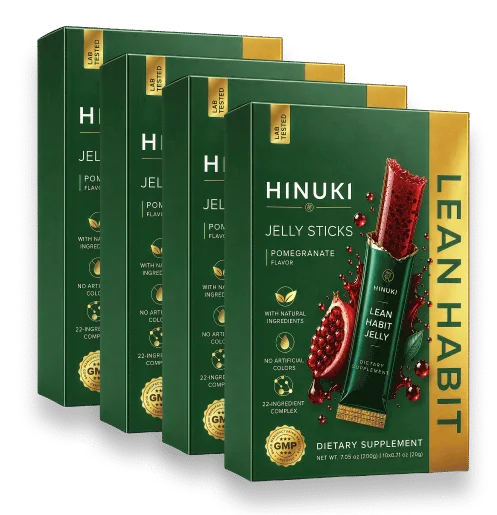
Our recommendation: Hinuki, a planned habit that keeps you full
If you want to swap mindless grazing for one smart, deliberate step, Hinuki Lean Habit Jelly is the option we recommend. (LeafTide, which we used to recommend, has been discontinued; Hinuki is a different product from a different maker.) It is a Korean-style pomegranate jelly stick made for exactly this: tear it open, chew it well and swallow, 1–2 sticks a day after meals.
- Made for fullness. 916.74 mg of prebiotic FOS per stick, plus chia seed and papaya extract, in a formula aimed at satiety and healthy appetite control.
- Gut-friendly. The prebiotic FOS helps feed the beneficial bacteria in your gut, part of the gut–craving connection the maker builds the product around.
- Light and clean. 10 calories, 0 g sugar, 16.7 mg of vitamin C (20% DV), caffeine-free and gluten-free.
- No water, no mixing, no pills. Individually wrapped sticks fit in a desk drawer, a lunch bag or a coat pocket.
- Simple pricing. $19.99 per pack for 4 packs (most popular), $24.99 per pack for 3, $29.99 per pack for 2 or $34.99 for a single pack of 10 sticks. Choose Subscribe & Save or a one-time purchase, backed by a 60-day money-back guarantee.
Hinuki is a dietary supplement that supports a healthy routine; it isn't a medicine and it doesn't replace balanced meals or your doctor's advice. Check with your doctor first if you're pregnant or nursing, diabetic, taking medication or managing a medical condition. For the full ingredient breakdown and our 4.6/5 verdict, read our Hinuki review or start from the Hinuki overview.
Frequently asked questions
What is mindless eating?
Mindless eating is eating while your attention is somewhere else: scrolling your phone, watching TV, working at your desk or driving. Because you barely notice the food, it is easy to eat more than you meant to and still not feel satisfied.
How do I stop eating while on my phone?
Make the phone part of the plan instead of the problem: put it face-down or in another room during meals, use a Focus mode or Do Not Disturb at mealtimes, and set app limits on the apps you tend to scroll while snacking. On iPhone that is Screen Time; on Android it is Digital Wellbeing.
Are there free tools to help with mindless snacking?
Yes, and most are already on your phone: the Clock app timer, Reminders or Google Calendar alerts for planned snacks, Screen Time or Digital Wellbeing app limits, Focus or Bedtime modes for the evening and a shared grocery list in Notes, Reminders or Google Keep.
Why do I keep snacking when I am not hungry?
Common triggers are boredom, stress, tiredness, habit (the same snack at the same time every day) and distraction. A quick pause to ask whether you are actually hungry, plus meals with enough protein and fiber, takes the edge off most of these triggers.
How long does it take to feel full?
Fullness signals take a while to reach the brain, which is why many nutrition guides suggest giving a meal around 20 minutes. Eating slowly, putting your fork down between bites and using a simple timer can help you notice fullness before you go back for more.
Can Hinuki help with mindless snacking?
Hinuki is a pomegranate jelly stick made to support fullness and healthy appetite control as part of a balanced routine. Taking one after your main meal, at a set time with a phone reminder, gives you a planned, 10-calorie habit instead of an unplanned snack. It complements mindful habits; it does not replace them.